The most critical signs your liquid cold plate needs replacement or an upgrade include persistently high operating temperatures despite cleaning, unusual grinding or gurgling noises from the pump, visible fluid leaks or corrosion around the fittings, and a noticeable decline in cooling performance over time. Ignoring these warnings can risk catastrophic failure of the components it's meant to protect, leading to costly damage and system downtime. A proactive approach to monitoring and maintenance is essential for ensuring the longevity and efficiency of any liquid-cooled system.

What is a Liquid Cold Plate and Why is it Crucial?
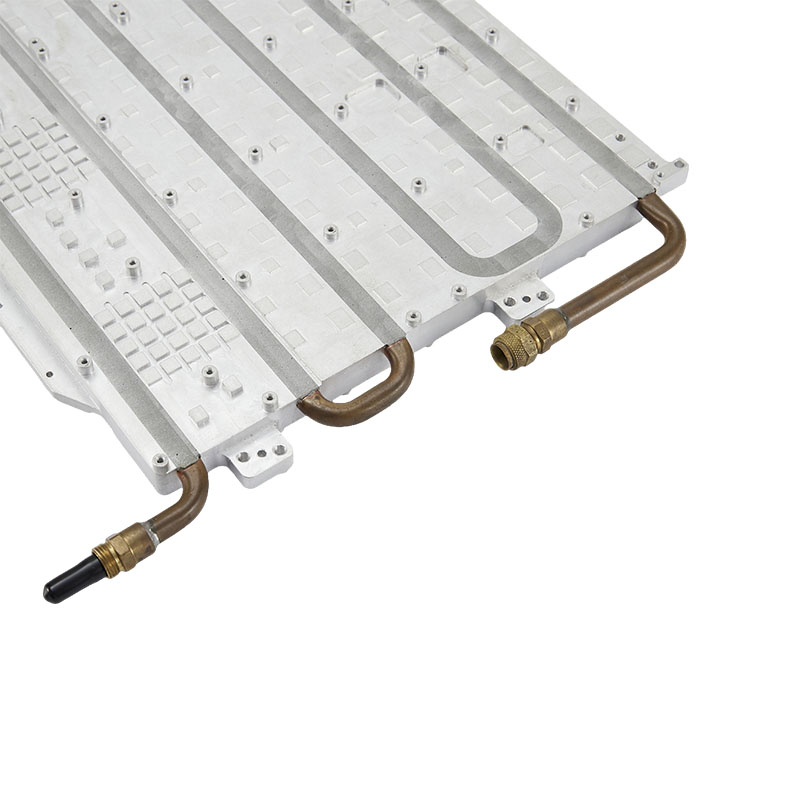
A liquid cold plate is the heart of a liquid cooling system, serving as the primary heat transfer interface. It's a precisely engineered block, typically made of copper or aluminum, that sits directly on top of a heat-generating component like a CPU, GPU, or power electronics. Inside this block are micro-channels or fins through which a coolant (usually a water-glycol mixture) flows. The coolant absorbs thermal energy from the component, carries it away to a radiator where the heat is dissipated into the ambient air, and then circulates back to the cold plate to repeat the cycle. Its efficiency directly dictates the maximum performance and stability of the component it cools.
1. Persistently High Operating Temperatures
The most undeniable sign of a failing liquid cold plate is a steady, inexplicable rise in component temperatures. If your CPU or GPU is idling at 45-50°C when it used to sit at 30°C, or if it quickly hits its thermal throttle limit under load (e.g., 95-100°C), your cooling system is no longer doing its job effectively. This isn't just a number on a screen; sustained high temperatures degrade silicon, reduce component lifespan, and cause performance instability through thermal throttling, where the component automatically reduces its clock speed to prevent damage.
What to Check First
Before condemning the cold plate, it's crucial to rule out other common culprits. This demonstrates due diligence and helps pinpoint the exact cause of the problem. First, check for dust buildup in the radiator fins and clean the system's fans, as restricted airflow is a primary cause of poor heat dissipation. Second, consider reapplying a high-quality thermal paste between the cold plate and the component. Old, dried-out thermal paste creates an insulating barrier that severely hampers heat transfer. If temperatures remain high after these steps, the issue likely lies within the liquid loop itself.
2. Unusual or Loud Pump Noises
A healthy liquid cooling pump should be nearly silent, emitting at most a faint hum. If you begin to hear new and alarming sounds, it's a major red flag. These noises are direct indicators of mechanical or hydraulic problems within the system.
Decoding the Sounds
Grinding or Rattling: This is one of the most severe symptoms, often indicating that the pump's impeller is failing or its bearings have worn out. The internal components are physically scraping against each other. This is a terminal condition, and the pump is on the verge of complete failure.
Gurgling or Sloshing: This sound suggests that air has entered the loop. Air bubbles can get trapped in the pump or cold plate, causing cavitation (the rapid formation and collapse of vapor pockets), which is not only noisy but also creates air pockets that act as insulators, drastically reducing cooling efficiency. While some gurgling can be normal after initial installation, persistent gurgling in a mature system points to a problem like permeation through the tubing or a leak.
High-Pitched Whining: A sudden increase in the pump's operational noise or a new whining sound can mean the pump is over-straining to push coolant through a partial blockage in the loop.
3. Visible Fluid Leaks or Stains
This is a critical, stop-everything-and-power-down situation. Any sign of moisture, active dripping, or crystalline residue around the cold plate fittings, tubing connections, or on components below the cooler is a sign of a leak. Liquids and electronics are a recipe for disaster, leading to short circuits and permanent hardware death. Leaks can originate from degraded seals, cracked fittings due to over-tightening, or brittle tubing. Even if the leak seems minor, it will only worsen over time and can cause a catastrophic failure without warning.
4. Corrosion or Discoloration on the Block
Take a close look at the cold plate itself, especially around the fittings. If you see green or white chalky buildup, you're likely witnessing galvanic corrosion. This electrochemical process occurs when incompatible metals (like aluminum and copper) are used in the same loop with a conductive fluid, or when the corrosion inhibitors in the coolant have broken down over time. Corrosion not only eats away at the metal, potentially causing micro-leaks, but the dislodged particles can also travel through the loop and create clogs in the delicate micro-channels of the cold plate, severely restricting flow.
5. Diminished Coolant Flow or Blockages
A clog is a silent killer of cooling performance. Over time, particulate matter—from plasticizer leaching out of PVC tubing, biological growth (if using improper fluid), or flakes from corrosion—can accumulate and obstruct the micro-fins inside the cold plate. The pump will struggle to maintain flow, and cooling will suffer dramatically. A tell-tale sign is feeling the inlet and outlet tubes; if the inlet tube is hot (carrying heat from the CPU) but the outlet tube is cool to the touch, it means the coolant isn't circulating properly through the radiator to dissipate heat. It's getting stuck, and the heat is staying concentrated at the cold plate.
6. Physical Damage to Tubing or Fins
Regular visual inspection can reveal signs of impending failure. Check the tubing connected to the cold plate. Is it becoming cloudy, discolored, or brittle? Is it kinked in a way that restricts flow? Kinked tubing acts like a bottleneck, reducing the GPM (gallons per minute) of the entire loop. Also, inspect the cold plate's mounting hardware. A cracked bracket or stripped screw can lead to uneven mounting pressure, creating a poor contact patch with the component and compromising thermal transfer. While not a failure of the plate itself, a damaged mount necessitates replacement of the unit.
7. The System is Approaching its End-of-Life
Even the best All-In-One (AIO) liquid coolers have a finite lifespan, typically estimated at 3 to 6 years. This isn't arbitrary; it's based on two key factors. First, the pump is a mechanical device with moving parts that will eventually wear out. Second, all-in-one coolers experience permeation, a natural process where a small amount of coolant very slowly evaporates through the microscopic pores of the rubber tubing. Over several years, this fluid loss can introduce air into the loop, reducing efficiency and putting more strain on the pump. If your cooler is over five years old and showing any of the other signs, it's wise to consider a proactive replacement rather than waiting for it to fail.
8. Incompatibility with New Hardware
One of the most common reasons to upgrade a cold plate is a CPU or platform change. CPU socket designs change every few generations (e.g., LGA 1200 to LGA 1700), and your old cold plate's mounting bracket may not be compatible with the new motherboard. While some manufacturers offer upgrade kits, they may not be available for older models. Furthermore, newer high-end processors have a much higher Thermal Design Power (TDP) and different die layouts. An older, smaller cold plate may not provide adequate coverage or have the thermal capacity to cool a modern, high-core-count CPU effectively, creating an immediate performance bottleneck for your new investment.
9. Frequent Software and Sensor Errors
Many modern liquid coolers interface with software to control pump speed, fan curves, and RGB lighting. If the control software (like Corsair's iCUE or NZXT's CAM) frequently fails to detect the pump, reports an RPM of zero, or shows erratic temperature readings that don't match other system sensors, it can indicate a problem with the pump's internal electronics or the sensor itself. While sometimes a software bug or USB connection issue, persistent errors after troubleshooting often point to a failing pump controller, which is integrated into the cold plate assembly.
10. Significant Thermal Performance Degradation Over Time
This is a more subtle sign that requires you to have a baseline. When you first installed your cooler, you may have run benchmarks and noted your peak temperatures. If you run those same benchmarks a year or two later (under similar ambient conditions) and find that your peak temperatures are now 10-15°C higher, it's a clear sign of performance degradation. This gradual decline is the cumulative effect of minor permeation, potential micro-clogging, and reduced pump efficiency over time. It's the system telling you that it's getting old and tired.
Replacement vs. Upgrade: Making the Right Choice
Once you've determined your cold plate is failing or inadequate, you have a choice: a direct replacement or a strategic upgrade. Your decision should be based on your system's current state and future goals.
| Scenario | Recommendation | Rationale |
| Your AIO cooler is relatively new but has a confirmed pump failure under warranty. | Replacement (RMA) | The most cost-effective solution. Contact the manufacturer for a warranty replacement. |
| Your current system meets your needs, but the old AIO is showing signs of age (noise, high temps). | Like-for-Like Replacement | If you're happy with performance, a new version of the same or a similar model restores cooling without complicating things. |
| You are planning to buy a new, higher-TDP CPU soon or want to start overclocking. | Upgrade | This is the perfect opportunity to invest in a more powerful cooler (e.g., a 360mm radiator instead of a 240mm) to handle the increased thermal load and provide overclocking headroom. |
| Your system is experiencing issues due to a clog or permeation in a custom loop. | Replace/Upgrade Component | In a custom loop, you can just replace the specific cold plate. Consider upgrading to a block with better flow characteristics or a monoblock that also cools the motherboard's VRMs. |
Frequently Asked Questions (FAQ)
How long do liquid cold plates / AIO coolers typically last?
The average lifespan of an All-In-One (AIO) liquid cooler is between 3 and 6 years. The primary failure points are the mechanical pump and gradual fluid loss through permeation. High-end custom loop components can last longer but require periodic maintenance, including fluid changes and block cleaning.
Can a clogged liquid cold plate be fixed?
For custom loop cold plates, yes. They can be disassembled, and the micro-channels can be carefully cleaned with a soft brush and distilled water. For AIO coolers, however, this is not possible as they are sealed units. A clogged AIO must be replaced entirely.
Is a little gurgling noise normal in a liquid cooler?
A slight gurgling sound for a few minutes after first installing a new cooler or moving the PC case is normal as small air bubbles work their way out of the pump. However, if the noise is persistent, loud, or starts suddenly in a well-established system, it indicates a problem.
What is the very first thing to check if my temperatures are high?
Before assuming the cooler has failed, your first two checks should always be: 1) Airflow: Ensure the radiator and fans are clean of dust. 2) Thermal Paste: Confirm the thermal paste application is correct and not dried out. These two factors account for a large percentage of high-temperature issues.
liquid cold plate, replace liquid cooler, upgrade liquid cooling, signs AIO is failing, liquid cooling failure, high CPU temps liquid cooling, cold plate corrosion, liquid cooler pump noise, when to replace AIO, thermal performance degradation, how to tell if liquid cooler is clogged, CPU cooler upgrade, liquid cooling maintenance